How to secure a vibe coded app: 8 fixes you can ship this week
Roughly 40% of AI-generated code contains critical vulnerabilities, and a scan of 1,645 apps on one popular vibe coding platform found 1 in 10 had exploitable security flaws. One single app leaked data on 18,000 users. Here are eight things to fix first.
1. Move your secrets out of client-side code
AI frequently hardcodes API keys directly in frontend JavaScript where anyone can extract them using browser dev tools. If you're using Supabase, the service role key is especially dangerous because it bypasses Row Level Security entirely. In the Lovable platform incident mentioned above, researchers found apps with exposed Supabase tokens accessible through public endpoints, leaking data on thousands of users, including students and enterprise accounts.
Fix: Search your codebase for any environment variable prefixed with NEXT_PUBLIC_ or VITE_ that contains a service role key or secret. Move all secrets to server-side environment variables that are never exposed to the browser. If you can open your browser's dev tools and find an API key, so can an attacker.
2. Enable Row Level Security on every database table
Supabase tables created without Row Level Security (RLS) are accessible to anyone with your project URL and anon key. This is the most common vulnerability in vibe-coded apps because AI tools rarely enable RLS by default. The catch-22: when RLS is enabled but has no policies, it blocks all access. So the AI often just skips it entirely to keep things working.
Fix: Open your Supabase dashboard. Every table in your public schema should have RLS enabled with at least one policy that restricts data access based on the authenticated user. Supabase publishes detailed RLS documentation with implementation patterns you can follow directly.
3. Add server-side input validation
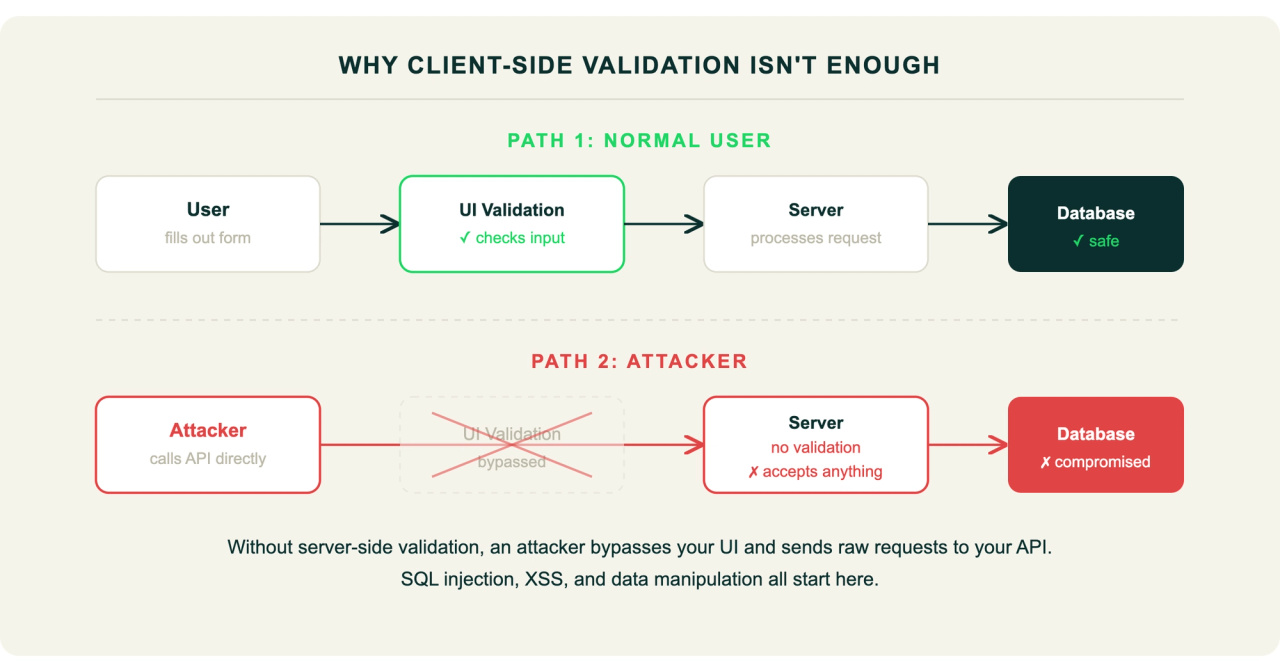
AI-generated forms often validate input in the browser but skip validation on the server. The UI won't let a normal user submit a bad form, but an attacker can call your API endpoint directly and send whatever they want. This opens the door to SQL injection, cross-site scripting (XSS), and other injection attacks.
Fix: Every API endpoint should validate and sanitize incoming data on the server, not just in the browser. Use established libraries like Zod or Joi. Try submitting <script>alert('test')</script> in your form fields and see what happens.
4. Implement proper authorization checks
AI-generated auth often checks "is the user logged in?" but not "is this user allowed to access this specific resource?" Client-only authentication checks look secure in the UI but are meaningless to anyone calling your backend directly. A recent study found 69 vulnerabilities across 15 test apps built by the five leading vibe coding tools, and the tools struggled most where what's safe versus what's dangerous depends on context. Authorization is exactly that kind of context-dependent problem.
Fix: Every API endpoint should verify that the requesting user has permission to access the specific resource they're requesting. Test it yourself: log in as User A, then try accessing User B's data by changing the ID in the URL or API request. If it works, you have a problem.
5. Add security headers
AI-generated apps frequently ship without standard security headers. These are free to add and protect against clickjacking, content injection, and protocol downgrade attacks.
Fix: Add at minimum: Content-Security-Policy, X-Frame-Options, X-Content-Type-Options, Strict-Transport-Security, and Referrer-Policy. Run your URL through securityheaders.com to see what you're missing. This is one of the fastest fixes on this list.
6. Run a static analysis scan
Your codebase likely contains vulnerability patterns that a scanner can catch automatically. An analysis of 470 open-source pull requests found AI co-authored code was 2.74x more likely to introduce cross-site scripting vulnerabilities than human-written code. A scanner catches these patterns in seconds.
Fix: Use a SAST tool to scan your codebase for known vulnerability patterns. Do this before your next deploy, not after. Better yet, make it part of your CI/CD pipeline so it runs on every pull request automatically.
7. Audit your dependencies
AI tools install packages without checking their security status. You may be shipping code that depends on libraries with known, published vulnerabilities that attackers already have exploits for.
Fix: Run npm audit (or the equivalent for your stack) and update packages with known vulnerabilities. Set up automated dependency monitoring so you're alerted when new vulnerabilities are disclosed in packages you use.
8. Set up security monitoring
If someone is probing your endpoints, brute-forcing authentication, or exfiltrating data, you need to know. Most vibe-coded apps have zero visibility into what's happening at runtime. You can't fix what you can't see.
Fix: At minimum, set up logging for authentication events, failed API requests, and unusual query patterns. If you're handling user data and have no monitoring, you may not find out about a breach until a user tells you, or worse, until a regulator does. Europe's Digital Operational Resilience Act (DORA) already holds companies accountable for the security of all deployed software, including AI-generated code.
Making security part of your development process
That's eight items across secrets management, database security, input validation, authorization, headers, static analysis, dependency auditing, and monitoring. Doing all of that manually, especially without a security team, is a lot to ask of a founder who's also building product, talking to customers, and hiring.
The good news: you don't need eight separate tools. Fencer covers static analysis (SAST), dynamic application security testing (DAST), dependency scanning (SCA), and security monitoring in one platform built for startups. It scans every pull request automatically before it merges, so the vulnerabilities in this checklist get caught during development instead of after release.