If you've ever tried to pipe a customer's Entra ID logs into your own Azure subscription and watched the destination silently stay empty, no errors, no retries, just nothing, this post is for you.
The problem
You run a multi-tenant security product. Your customer is on Azure, and you need their Entra ID audit logs, sign-in logs, subscription activity logs, and maybe a few resource-level logs (Key Vault, Storage, SQL) to land in your storage so you can ingest them into your data lake.
The Azure-native answer looks obvious: Diagnostic Settings. Point them at a destination, done. There are three supported destination types, Storage Account, Event Hub, Log Analytics, and both the portal and the ARM API happily let you configure a resource in a different subscription.
Then you wait. And nothing arrives.
Welcome to one of the most underdocumented limitations in Azure Monitor: Diagnostic Settings do not actually deliver across subscriptions or tenants in practice for Entra ID logs in a way you can rely on for production ingestion. The portal lets you wire it up. The ARM API accepts the call. The destination just stays empty.
We spent multiple POCs working around this. The fix turned out to be a mental flip: stop trying to make Azure write across subscriptions, and let it read across them instead. Below is the full arc, from failure to discovery to fix, with concrete numbers from a working POC.
Why the obvious approaches fail
Cross-subscription / cross-tenant Diagnostic Settings
You set up a Diagnostic Setting on the customer's Entra ID tenant or subscription and point it at your Storage Account. The control plane accepts it. The data plane never delivers.
There's no error event, no metric, no clear breadcrumb. Same-subscription deliveries from the same Diagnostic Setting work fine; cross-subscription deliveries silently disappear. We confirmed this by running both configurations side-by-side: one same-sub destination filled up, one cross-sub destination stayed at zero blobs after 30 minutes of generated traffic.
Important caveat: Microsoft documents cross-subscription support with RBAC (and Lighthouse for cross-tenant). In practice, real-world Entra ID deliveries frequently fail silently outside strict same-subscription boundaries, exactly what we observed across multiple POCs.
This applies to all three destination types as far as we could test. Storage Account: zero. Event Hub: zero. Log Analytics: cross-tenant is documented as unsupported and the workspace stays empty, and even where it is supported, Microsoft documents up to 3 days of first-data delay, which is worse than Storage or Event Hub.
"Just use Object Replication"
Plausible-sounding workaround: let Azure Monitor write to a customer-owned Storage Account in the customer's subscription (which works), then use Azure Storage's built-in Object Replication to copy the blobs to your Storage Account in your subscription.
In a clean POC with manually-uploaded blobs, this is great. Replication latency was ~2 minutes cross-subscription and we saw zero errors.
The catch: Azure Monitor writes its PT1H.json files as AppendBlobs. Object Replication only supports BlockBlobs; AppendBlobs and PageBlobs are explicitly excluded, and as of this writing (May 2026) Microsoft's documentation still calls this out as a hard limit.
So the moment you point Object Replication at the actual Diagnostic Settings output, replication does nothing. The blobs that show up are exactly the type that can't be replicated.
"Use Event Hub Capture"
Another workaround: have Diagnostic Settings stream to an Event Hub in your subscription, and use Capture to land Avro files in your storage.
This fails at step one: cross-subscription delivery from Diagnostic Settings to an Event Hub silently fails just like it does to a Storage Account. We ran the same test on a same-subscription Event Hub for 31 minutes with real Entra traffic, Capture wrote empty Avro files every 60 seconds and zero real events landed. Same-subscription Event Hub destinations did receive events fine in parallel.
(There are a couple of CLI footguns worth noting if you go down this path anyway: --message-retention was renamed to --retention-time, and Event Hub auth rules need to be created at the namespace level, not the event-hub level, before Capture works. They're not the root cause, but they cost time to discover.)
Why the silent failure?
The most likely explanation: Diagnostic Settings delivery runs as a tenant-scoped service identity that lacks, and cannot be granted, data-plane write permissions on a destination in a different trust boundary. The control plane validates that the destination exists, not that the writer can actually write. Result: a configuration that looks healthy and produces nothing.
The insight
Every workaround above is trying to make Azure push data across the trust boundary. None of them work reliably.
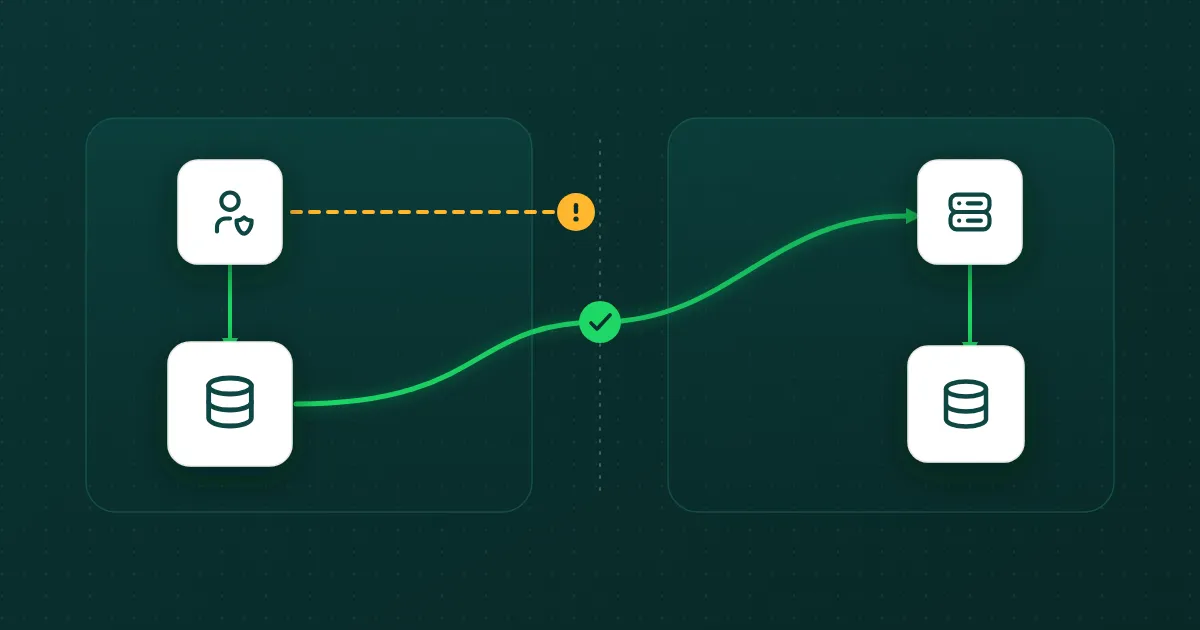
The flip: let Azure write same-subscription (which always works), and have your code read cross-subscription instead. Storage account reads with a service principal cross-subscription work fine, that's a data-plane operation, not a control-plane delivery.
Once you accept that, the architecture falls out:
Three things to notice:
- The customer owns the storage account. Diagnostic Settings is writing inside the customer's subscription, the case Azure actually supports.
- You read across the boundary. Cross-sub reads with a least-privileged role (
Storage Blob Data Reader+Storage Queue Data Message Processor) are well-supported. - You re-upload as BlockBlob in your landing zone. That makes the REST of your pipeline (Snowpipe, blob lifecycle, replication for DR, etc.) identical to the BlockBlob world it already knows.
The working POC
We ran this end-to-end against a real test tenant, with real Entra traffic generated by a script (signed-in users, failed logins, app create/delete).
| Metric | Value |
|---|---|
| Blobs copied | 23 (12 audit + 11 sign-in) |
| Total wall-clock | 48 seconds |
| Per-blob copy time | 1 to 2 seconds |
| Blob sizes | 2.4 KB to 524 KB |
| Errors | 0 |
| Diagnostic Settings to customer storage | 30 s to 3 min (observed steady-state, post-warm-up; Microsoft publishes no SLA) |
| Event Grid to queue propagation | sub-second |
By contrast, the two failed approaches we tested before this, Event Hub Capture across subscriptions and Object Replication of the AppendBlob output, delivered zero real events in 10-minute and 31-minute Windows respectively, with identical traffic generation in parallel.
What the customer has to set up
This is the part that makes the architecture viable for a SaaS: the customer-side footprint is small, scriptable, and cheap (a few dollars per month at most).
In the customer's subscription, you need:
- A Storage Account to hold the diagnostic exports (standard LRS is fine; the AppendBlob constraint only matters if you tried to replicate).
- A Diagnostic Setting for each log source (Entra audit, sign-in, activity, Key Vault, etc.) pointing at that storage account. These are same-subscription, so they actually deliver.
- An Event Grid system topic on the storage account, filtering for
Microsoft.Storage.BlobCreated. - A Storage Queue (on the same storage account) as the Event Grid subscription's destination.
- A Service Principal with two least-privilege built-in role assignments:
Storage Blob Data Reader(2a2b9908-6ea1-4ae2-8e65-a410df84e7d1) on the storage account, for blob reads. Storage Queue Data Message Processor(8a0f0c08-91a1-4084-bc3d-661d67233fed) on the queue, for the get + delete cycle (this role grants both, whereStorage Queue Data Readerwould only allow peek).
That's it. No cross-tenant federation, no Lighthouse onboarding, no nested ARM templates. The customer-side pieces are all native Azure Monitor and Storage primitives wired in their normal directions.
The harder part, and the part that bit us before we found this approach, is the creation permissions. To bootstrap the Diagnostic Settings on Entra ID, the calling identity needs Security Administrator (or equivalent) at the directory level, plus Monitoring Contributor on the subscription, plus Storage Account Key Operator and listkeys on the storage account before it tries to wire up the Diagnostic Setting. Miss any one and the SDK call fails with an opaque error halfway through.
The poller, in 25 lines
The whole cross-sub read loop is unremarkable on purpose. Pseudocode close to what we actually run, using the Azure SDK for Python:
from azure.identity import DefaultAzureCredential, ClientSecretCredential
from azure.storage.queue import QueueClient
from azure.storage.blob import BlobServiceClient

# Customer-tenant SP for the cross-boundary reads.
cust_cred = ClientSecretCredential(
    tenant_id=CUSTOMER_TENANT_ID,
    client_id=CUSTOMER_CLIENT_ID,
    client_secret=CUSTOMER_SECRET,
)

queue = QueueClient(account_url=CUSTOMER_QUEUE_URL, queue_name="diag-events", credential=cust_cred)
src   = BlobServiceClient(account_url=CUSTOMER_BLOB_URL, credential=cust_cred)
dst   = BlobServiceClient(account_url=LANDING_ZONE_URL, credential=DefaultAzureCredential())

while True:
    for msg in queue.receive_messages(messages_per_page=32, visibility_timeout=60):
        for event in parse_event_grid(msg.content):  # may be batched
            if event["eventType"] != "Microsoft.Storage.BlobCreated":
                continue
            container, blob = parse_blob_url(event["data"]["url"])
            data = src.get_blob_client(container, blob).download_blob().readall()
            dst.get_blob_client(container, blob).upload_blob(
                data, overwrite=True, blob_type="BlockBlob"
            )
        queue.delete_message(msg)
Three things to notice: (1) reads use a service principal scoped to the customer's tenant; the writer is your identity in your sub; (2) the upload forces BlockBlob, which is what makes the REST of the pipeline behave; (3) ack happens after the copy, not before, if the upload throws, the message returns to the queue after the visibility timeout.
Gotchas we hit
These are the rough edges nobody warns you about.
Entra ID logs have two latency floors. First-data delay is ~24 hours for Storage and Event Hub destinations, up to 3 days for Log Analytics. This is the single most common reason engineers think their setup is broken when it isn't. If you're testing the cross-subscription bug described above, run it for at least 24 hours on a same-sub destination first, otherwise you can't tell first-data warmup from the silent-failure bug. Steady-state delay is 30 seconds to 3 minutes in our POC, but Microsoft publishes no per-category SLA. Treat that as anecdote, not contract.
The blob path format will trip you up. Diagnostic Settings writes to insights-logs-<category>/tenantId=<TENANT_ID>/y=YYYY/m=MM/d=DD/h=HH/m=mm/PT1H.json. That PT1H.json is a single file per hour, written as an AppendBlob, that keeps growing until the hour rolls over. Read it mid-hour and you get a partial file. We process on BlobCreated events from Event Grid and trust per-hour granularity; if you need sub-hour latency, budget time for offset-tracking.
Event Grid filtering matters. A naive subscription on Microsoft.Storage.BlobCreated fires for every blob in the storage account, including the one-byte placeholders Azure Monitor writes for hours with zero events. Filter on the subject prefix (/blobServices/default/containers/insights-logs-…) and on minimum size to skip empty hours. Separately, prefer service-principal auth over storage account keys for the poller, key rotation on the customer side silently breaks ingestion, and you won't notice until events stop flowing.
What customer onboarding actually looks like
The customer-side resources are cheap to create, but the calling identity needs unusually broad permissions to wire everything up. We ship a single script the customer (or their cloud admin) runs in their own subscription, authenticated as a user with:
Security Administratorat the directory level (to enable Entra ID Diagnostic Settings, the tenant-scoped log source needs this even though the destination is a regular subscription resource).Monitoring Contributoron the subscription (to create and manage Diagnostic Settings on subscription-scoped resources).Storage Account Contributoron the resource group (to create the storage account with blob versioning + change feed enabled).
The script creates the resource group, storage account, queue, Event Grid topic, Diagnostic Settings (one per category), and service principal with the two least-privileged storage roles, then prints the credentials your SaaS side needs.
The one bootstrap landmine worth highlighting: the SDK's diagnosticSettings.createOrUpdate call needs listkeys permission on the storage account, even though the Diagnostic Setting itself doesn't reference a key. Miss that and you get an opaque "the destination storage account is not valid" error. The fix is a Storage Account Key Operator role assignment with a 30-second propagation sleep before the next call.
Why Sentinel doesn't have this problem
If you've used Sentinel, you might be thinking: it ingests Entra ID logs across tenants without any of this nonsense. True. Sentinel sits on top of Log Analytics, which participates in Azure Lighthouse, Microsoft's delegated-resource-management framework that bridges the trust boundary at the control plane. The same boundary that defeats Diagnostic Settings for everyone else.
That doesn't translate to a third-party product. Lighthouse delegates to an Azure tenant, so a SaaS that isn't running inside an Azure tenant can't be the delegate. And Lighthouse-delegated ingestion still flows through Log Analytics, which has its own multi-day first-data latency and isn't a cheap general-purpose log store. Sentinel's solution is real, just not portable. The customer-storage + cross-sub-read pattern is the closest a non-Sentinel SIEM can build.
What we learned
The failure modes are silent and the docs won't warn you. Every team we've talked to has arrived at some variant of this architecture independently, because Microsoft's documentation does not say "Diagnostic Settings cannot reliably write across subscriptions."
The customer-storage + cross-sub-read pattern works. Sub-minute steady-state latency in our POC, zero data loss, a tiny customer footprint, and it fails loudly when something breaks (auth errors on read, queue backlog you can alert on) instead of silently producing nothing.
If you're early in the design phase, skip the detours. Don't try Object Replication. Don't try cross-sub Event Hub. Build customer-storage + cross-sub-read from day one.
The onboarding script and Terraform module are in progress. If you've solved this differently, we'd rather converge on a shared pattern than have every team rediscover the AppendBlob trap independently.