A vulnerability management tool should do four things across your whole stack: find vulnerabilities itself rather than only aggregate other scanners, prioritize the few that matter by real risk instead of raw severity, fix them, and confirm the fix actually closed the finding. For a small team the deciding question is how much of that loop the tool runs for you, and whether it covers your whole stack in one place. The traps to avoid are aggregators that only add value on top of the scanners you already pay for, scanners that stop at a prioritized list and hand the work back, point tools that each cover a single surface, and enterprise pricing that assumes a security department.
What is vulnerability management?
Vulnerability management is the ongoing practice of finding weaknesses across the software and infrastructure you run, deciding which ones matter most, fixing them, and confirming they are gone. It runs continuously, because you ship new code and new vulnerabilities are disclosed every week.
How vulnerability management works
Vulnerability management runs as a loop: contextualize, prioritize, remediate, verify, and report.
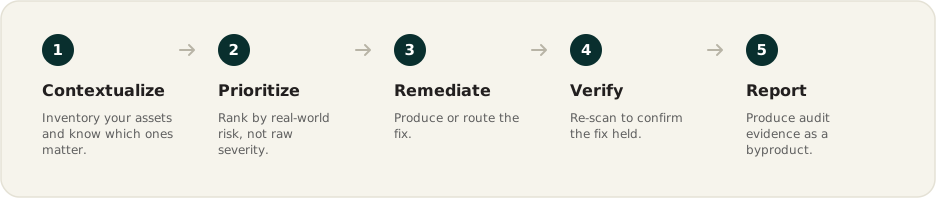
- Contextualize: inventory your assets and know which ones matter.
- Prioritize: rank by real-world risk, not raw severity.
- Remediate: produce or route the fix.
- Verify: re-scan to confirm the fix held.
- Report: produce audit evidence as a byproduct.
When to consider a vulnerability management tool
A handful of manual scans a year works until it does not. Consider a dedicated tool when any of these apply:
- A regular release cadence: you ship code often and run cloud infrastructure, so new weaknesses appear between any once-a-year check.
- Compliance evidence: you have completed, or are pursuing, SOC 2 or ISO 27001 and need ongoing evidence of a vulnerability management program.
- Security questionnaires: enterprise prospects are asking how you find and fix vulnerabilities before they will buy.
- A growing, multi-surface footprint: your risk is now spread across code, cloud, dependencies, containers, and more, and no single point tool sees all of it.
- No dedicated security team: the work is landing on engineers who do not do security full time.
- A scanner stack you are stitching together: you already run several scanners and spend time deduplicating and correlating their output by hand.
The key evaluation criteria for vulnerability management tools
Score each tool on nine things. The order reflects where small teams save the most time: the first four decide how much of the loop the tool runs for you and whether it covers your whole stack.
- Coverage across your whole stack: one platform, or a tool per surface?
- First-party scanning or aggregation: does it find vulnerabilities, or need the scanners you already pay for?
- Remediation: does it fix, or hand you a list?
- Verification: does it confirm the vulnerability is actually gone?
- Risk-based prioritization: does it rank by real risk, not raw severity?
- Noise reduction: will thousands of raw findings become a workable list?
- Ownership and workflow: can one person run it and route the rest?
- Evidence and compliance: does audit evidence fall out of the work?
- Pricing and fit: is it published and sized for your team?
Coverage across your whole stack: one platform, or a tool per surface?
Coverage is the range of surfaces a tool assesses, from source code and dependencies to cloud, containers, secrets, network, and the running app. It matters because your risk is spread across all of them, and covering each with a separate point tool means several bills, several consoles, and correlating findings by hand. For a lean team, consolidation into one platform is where the time and money are saved.
Key considerations:
- One platform, many surfaces: code, cloud, dependencies, containers, secrets, network, endpoints, and the running app in one place.
- One inventory and one view: assets and findings correlated automatically, not stitched together across tools.
First-party scanning or aggregation: does it find vulnerabilities, or need the scanners you already pay for?
This is whether the tool runs its own scanning, or sits on top of scanners you license separately and consolidates their output. It matters because an aggregation layer only adds value if you already own, and keep paying for, a stack of scanners underneath it.
Key considerations:
- Finds it itself: first-party detection across your surfaces, so there is no separate scanner to buy for each one.
- No stack tax: you are not paying for an aggregation layer on top of the scanners it depends on.
Remediation: does it fix, or hand you a list?
Remediation is whether the tool performs the fix, or stops at a prioritized list your engineers work through. It matters because a list with no path to a fix is just backlog, and the value is in what actually gets closed. This is the criterion legacy scanners and aggregators most often skip.
Key considerations:
- Produces the fix: a pull request for a code issue, or a direct correction for a supported cloud misconfiguration.
- Routes the rest: an owner and a ticket for what it cannot fix automatically.
Verification: does it confirm the vulnerability is actually gone?
Verification is whether the tool re-checks after remediation, rather than trusting that a closed ticket equals a closed vulnerability. It matters because "marked resolved" and "resolved" are not the same, and the gap between them is where real risk hides.
Key considerations:
- Re-scan to close: a finding moves to resolved only once a re-scan no longer sees it.
- Human confirmation where it counts: a checkpoint for changes that warrant a person's sign-off.
Risk-based prioritization: does it rank by real risk, not raw severity?
Prioritization is the set of signals a tool uses to rank findings so a small team works the few that matter. It matters because a raw CVSS list buries the handful that are actually exploitable and exposed. Most serious tools do this reasonably well, so treat it as a bar to clear, not the tie-breaker.
Key considerations:
- Context over CVSS: asset criticality, internet exposure, and exploit likelihood (EPSS and known-exploited data), not severity alone.
- A ranking you can trust: good enough to work top-down without re-triaging every finding.
Noise reduction: will thousands of raw findings become a workable list?
Noise reduction is whether the tool groups and deduplicates findings, or hands you every raw alert. It matters because alert fatigue is the most common reason a small team abandons a tool.
Key considerations:
- Grouped and deduplicated: related findings collapsed into a short set of items.
- A queue, not a firehose: a working list, not a constant stream of raw alerts.
Ownership and workflow: can one person run it and route the rest?
This is whether the tool assumes a staffed security function, or is built to be run by the people you already have and to route work into the tools you use. It matters because most small teams do not have a dedicated security engineer to operate it.
Key considerations:
- Runs without a security team: does the work and escalates only the decisions that need a human.
- Fits your tools: an assignee per finding and ticketing into Jira or Linear.
Evidence and compliance: does audit evidence fall out of the work?
This is whether the tool produces the SOC 2 or ISO 27001 evidence as a byproduct, or makes reporting a separate project. It matters because a vulnerability management program is increasingly a customer and audit requirement, and you want the paperwork to follow the work.
Key considerations:
- Evidence as a byproduct: dashboards, progress tracking, and evidence that syncs to your GRC tool.
- Audit-ready without a scramble: the record stays current because the work is continuous.
Pricing and fit: is it published and sized for your team?
This is whether pricing is public and the entry tier fits a small budget, or is quote-gated and priced for an enterprise. It matters because a lean team needs to evaluate the fit without a procurement cycle.
Key considerations:
- Published pricing: you can read the cost and the entry tier without a sales call.
- Sized for a small team: a real entry tier and a trial, not an enterprise floor.
Evaluation checklist
Score each tool across the full loop, because a tool can be strong at finding and absent at fixing:
- Covers the whole stack in one platform, not a tool per surface.
- Finds vulnerabilities itself, without a separate scanner stack underneath.
- Fixes what it finds, ideally producing the fix.
- Verifies with a re-scan before closing.
- Prioritizes by real risk (asset criticality, exposure, EPSS), not raw CVSS.
- Cuts the noise into a short, workable queue.
- Runs without a security team and routes work into your tools.
- Produces audit evidence as a byproduct.
- Publishes pricing you can evaluate without a sales call.